
Bytos is an
Autonomous Coding Agent
An open-source, multi-provider coding agent that plans, executes and verifies software work with approval-first controls. Currently available as a VS Code extension.
Current platform: VS Code. Open source · Apache-2.0 · provider keys in SecretStorage. See how it works Available on the Marketplace
An autonomous agent, not a single-IDE feature
Bytos is built around autonomous software work and multi-provider model choice. VS Code is the current environment, not the product category.
Autonomous Coding Agent
Plans multi-step work, executes tools with approval, checks results and keeps a reviewable record.
Explore the categoryMulti-Provider Coding Agent
Choose providers and models per task or per Auto Phase, with keys stored in VS Code SecretStorage.
Explore the architectureHow Bytos works
From task and context to plan, approval, execution, verification and a reviewable result.
See the workflowDownload Bytos
Bytos runs inside Visual Studio Code. Install it from the Visual Studio Marketplace, add your own model key, and start in under a minute.
Windows, macOS and Linux. No Bytos account required. Get VS Code first.
VS Code today. Built to expand.
Bytos currently runs as a Visual Studio Code extension. VS Code is the current environment, not the product category.
Current: VS Code
Install from the Marketplace, connect a provider and use the agent inside VS Code.
VS Code detailsRoadmap: more surfaces
JetBrains, Cursor, Windsurf, CLI and a standalone IDE are future targets, not available today.
See platform statusInstall what exists today
Use the VS Code Marketplace. There are no installation instructions for unsupported environments.
Install for VS CodeOne agent, multiple model providers
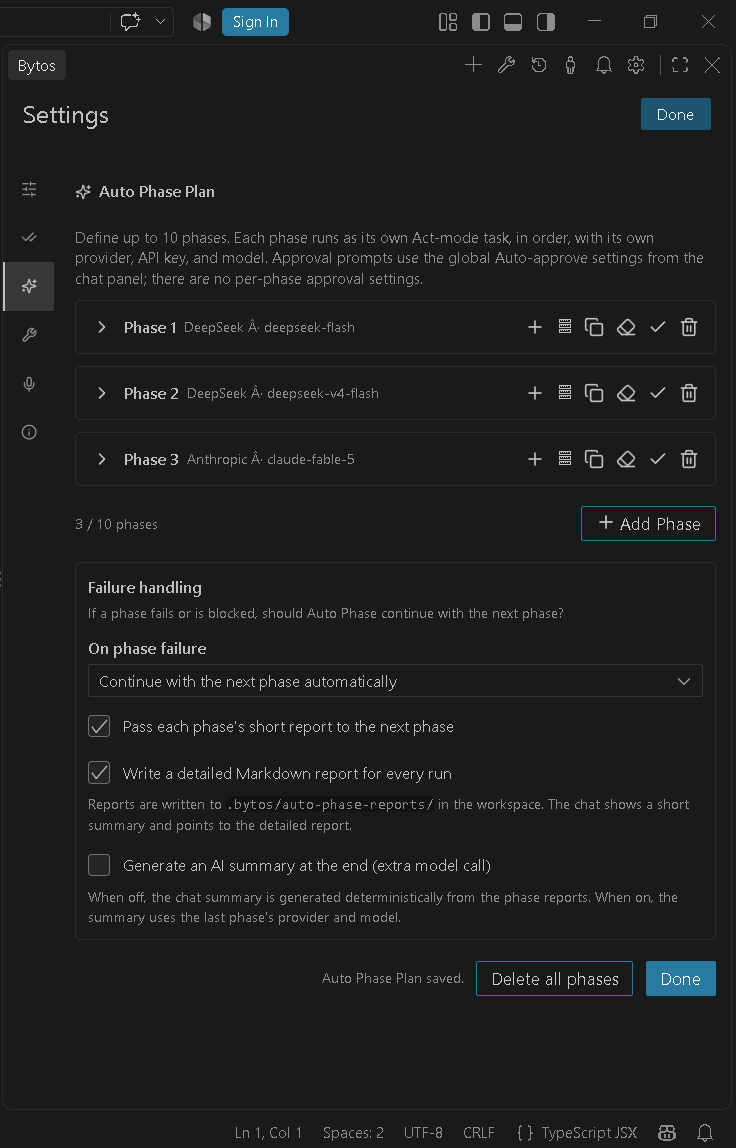
Choose the provider and model that fit the task, or give each Auto Phase its own settings.
Provider choice
OpenRouter, Anthropic, OpenAI, Google Gemini, AWS Bedrock, Azure, GCP Vertex, Cerebras, Groq and OpenAI-compatible endpoints.
Per-task and per-phase models
Use different providers or models for planning, implementation, review or each sequential Auto Phase.
Local models and key control
Connect Ollama or LM Studio, and keep provider keys in VS Code SecretStorage instead of plaintext files.
Built for real coding work
Three things Bytos does differently from a chat window.
Plan first, then execute
Bytos breaks a task into steps, shows the plan and checks in before risky actions. Every change is a reviewable diff.
Approval-first tools
File reads, edits, terminal commands, browser access and MCP tools require your approval until you opt in per category.
Bring your own key
Connect OpenRouter, Anthropic, OpenAI, Gemini, local Ollama and more. Keys stay in VS Code SecretStorage.
Security and privacy defaults
Bytos is designed to stay local-first and approval-first.
Fail-closed approvals
File reads, edits, terminal commands, browser access, MCP tools and unknown tools require approval by default. Auto-approval is opt-in per category.
Workspace boundaries
File tools enforce a canonical workspace boundary, including absolute paths, traversal, Windows drive/UNC paths and symlinks.
Telemetry off by default
Telemetry is enabled only by an explicit opt-in. Disabling it stops PostHog events and feature flags.
AI coding agent guides
Practical, source-based guides on open-source agents, bring-your-own-key workflows, VS Code setup and autonomy.
Best open source AI coding agents
Compare Bytos, Cline, Kilo Code, OpenCode, Aider and OpenHands by interface, model access and approval model.
Read the guideBest Cline alternatives
When an IDE agent, a terminal pair programmer or an autonomous platform is the better fit.
Read the guideBYOK AI coding agents explained
How bring-your-own-key works, where keys are stored, and what to check before connecting a provider.
Read the guideFind Bytos Across the Developer Community
Discover Bytos, follow development updates, explore the source code, and join the community.